Your PC is using more electricity than you think.

The world's first real-time PC power consumption monitor. See exactly how many watts each application uses, track your carbon footprint, and cut your energy bill — in English and French.

Open source · Built in Rust · AMD, Intel & NVIDIA · Near-zero overhead · English & French
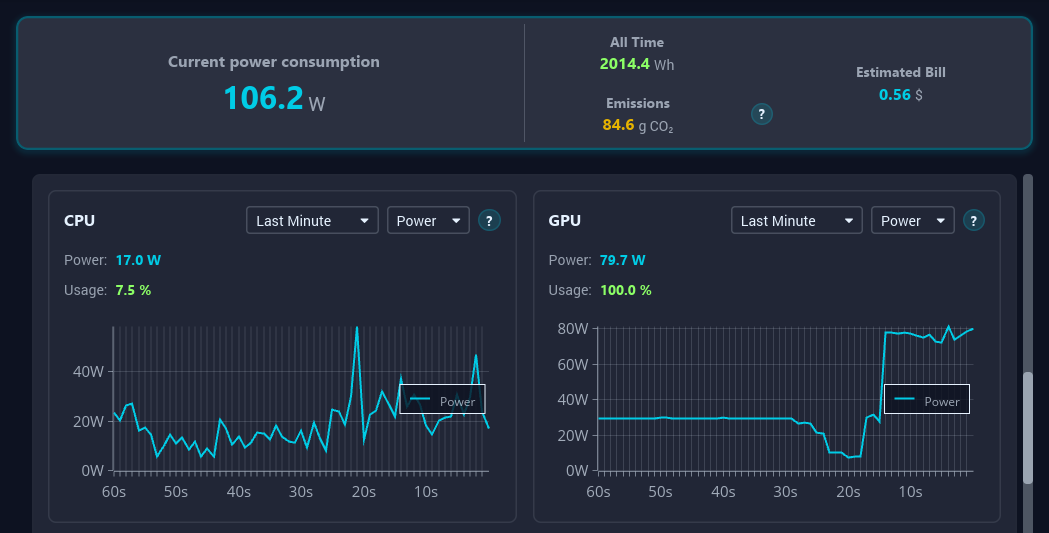
WattSeal app dashboard showing real-time power consumption breakdown by application and component
100% Private — No Telemetry
Built in Rust — Near-Zero Overhead
Works on Windows, macOS & Linux
Available in English & Français

Make the Invisible Visible

A typical desktop PC consumes between 80W and 400W depending on your daily usage. Left unchecked over a year, that amounts to 200 to 1000 kWh — roughly €30 to €180 added to your electricity bill, and much more in regions with higher energy costs.

Beyond the financial cost, the average PC produces 100 to 400 kg of CO₂ equivalent per year from electricity alone. That's comparable to driving a car for 500 to 2000 km.

Most people have no idea which applications are responsible. A 3D game and a background browser tab mining crypto can both silently drain 100W+ without you noticing. WattSeal makes this hidden consumption completely visible.

Start Saving Today →
~200W
Average desktop gaming/work consumption
€120/yr
Average annual PC electricity cost
~200kg
Average annual CO₂ equivalent footprint
Core Features

Built for Everyone

Designed to be instantly understandable, whether you're a gamer, a creative professional, or just conscious of your energy bill.

Real-Time Power Monitor

See your total PC consumption in watts, updated live. Understand your baseline usage at a glance — no technical knowledge needed. WattSeal reads directly from your PC's built-in hardware sensors via RAPL and NVML — no smart plug or external hardware required.

Per-App Breakdown

See which apps cost you the most — measured in watts, converted to euros, and tracked in CO₂. No other tool does this.

Carbon Footprint Tracker

Your power usage is automatically converted to CO₂ based on your local grid's carbon intensity. Choose from preset regions (e.g. France, USA, China) or enter a custom value for accurate results.

France — 42 gCO₂/kWh (nuclear)
USA (average) — 384 gCO₂/kWh (mixed)
China — 555 gCO₂/kWh (coal)

Multilingual Support

WattSeal speaks your language. The entire interface — every metric, every explanation, every tooltip — adapts to your preferred language. Built for a global audience from day one.

Plain-Language Explanations

Every component and metric comes with a clear, accessible explanation. You don't need to know what a GPU is to use WattSeal. Everything is explained in simple terms, available in both English and French.

Powerful for Advanced Users

Per-Component Breakdown

CPU, GPU, RAM, storage, and network interfaces are continuously and individually measured.

Time Granularity

Switch between real-time, 1-minute, 1-hour average, or custom time ranges.

Local SQLite Database

All consumption data is stored in a local SQLite database. Query it directly for custom analytics and third-party integrations.

The Problem

Why We Built WattSeal

Standard OS tools don't tell the whole story. Windows Task Manager shows CPU percentage, but percentage does not equal watts. A process using 10% CPU might draw more power than one using 20%, depending on instructions executed.

Hardware monitors like HWiNFO read precise sensors but don't map readings to your software. GPU-Z is limited to graphics cards. MSI Afterburner provides overlays but doesn't show per-app electricity cost. WattSeal bridges all this telemetry into one unified view.

A monitoring tool that itself uses significant power would be self-defeating. That's why WattSeal is built in Rust — engineered for near-zero overhead while running silently in the background.

Comparison

The Most Comprehensive Monitor

See how WattSeal compares to standard system utilities and hardware monitors.

Feature WattSeal Task Manager HWiNFO GPU-Z MSI Afterburner
Per-application power ✓ Yes ✗ No ✗ No ✗ No ✗ No
Per-component power ✓ Yes ✗ No Partial (CPU/GPU) Partial (GPU) Partial (GPU)
Real-time watts display ✓ Yes ✗ No ✓ Yes ✓ Yes ✓ Yes
Carbon footprint tracking ✓ Yes ✗ No ✗ No ✗ No ✗ No
Electricity cost estimate ✓ Yes ✗ No ✗ No ✗ No ✗ No
Multi-language UI ✓ EN & FR ✓ Yes ✓ Yes ✓ Yes ✓ Yes
Custom carbon intensity ✓ Yes ✗ No ✗ No ✗ No ✗ No
Near-zero overhead ✓ Yes (Rust) Partial Partial Partial Partial
Open Source ✓ Yes ✗ No ✗ No ✗ No ✗ No
Under the Hood

How It Actually Works

WattSeal runs a lightweight background daemon that reads hardware telemetry directly from RAPL (Intel/AMD CPUs), NVML (NVIDIA GPUs), and ADLX (AMD GPUs). For components without built-in energy sensors — RAM, disk, and network — power draw is estimated from usage activity.

To attribute power to individual apps, WattSeal uses process accounting — tracking hardware utilization per thread and mapping it proportionally against measured power draw. Readings are validated against real hardware measurements using a smart plug.

All data is stored locally in SQLite. No cloud accounts, no tracking pixels, no analytics. WattSeal is 100% open source — verify every claim yourself.

Get WattSeal Free

Start monitoring your PC's power consumption today.

Download for Windows (.exe) Download for macOS (Apple Silicon) Download for Linux

Always free. Always open source. No telemetry. Your data stays on your machine.

Frequently Asked Questions

How much electricity does an average PC use per year?

A typical desktop PC consumes between 80W and 400W depending on usage. Over a year of daily use, that equals roughly 200 to 1000 kWh, which costs between €30 and €180 in electricity in Europe.

How does WattSeal measure power consumption per application?

WattSeal reads hardware energy counters to measure real power draw, then uses process-level accounting to determine how much each running application is responsible for — all updated in real time. See the technical details section for more.

Can WattSeal show me my carbon footprint from using my PC?

Yes. WattSeal includes a native carbon footprint tracker that automatically converts your physical power consumption into CO₂ equivalents based on the carbon intensity of your local electricity grid. You can choose your region's carbon intensity for accurate results.

Does WattSeal work with AMD CPUs and NVIDIA GPUs at the same time?

Yes, WattSeal is entirely cross-vendor compatible. It natively supports hardware from AMD, Intel, and NVIDIA simultaneously, reading the appropriate sensor data regardless of your system configuration.

Will WattSeal itself slow my PC down?

No. WattSeal is engineered in Rust specifically to be extremely lightweight. It operates with near-zero overhead, ensuring the monitoring tool itself does not contribute to your power consumption or degrade performance.

What languages does WattSeal support?

WattSeal currently supports English and French, with a fully localized interface for each language. More languages are planned based on community demand.

Can I customize the carbon intensity for my region?

Yes. WattSeal lets you select your local electricity grid's carbon intensity so your CO₂ calculations are accurate — whether you're on a clean nuclear grid like France or a coal-heavy grid like Poland.

Is WattSeal free and open source?

Yes, WattSeal is 100% free and open-source software (GPLv3). Review the entire source code on GitHub. Your telemetry data never leaves your machine.

Can I access my power consumption data?

Yes. WattSeal stores all data in a local SQLite database that you can query directly for custom analytics and third-party integrations. Your data is always yours — nothing is sent to the cloud.